Trace a picture
Trace takes a picture on the canvas and gives you back a vector outline you can colour, reshape and edit point by point. The result stays in your project and is never added to a font.
When you need it
You need it when what you have is an image: a photographed pen drawing, an old logo, a scan of a sheet of paper. A picture cannot be recoloured or edited point by point, and an outline can.
If you want a letter that goes into one of your own fonts, that is the Font Builder's job, not this tool's.
Tracing a picture
Nothing on your canvas changes until you press the button, so you can try the settings freely.
- Place the picture on the canvas and select it.
- Open the Trace panel from the options bar.
- Pick a preset and watch the preview.
- Adjust the Quality controls if you need to.
- Press Trace picture.
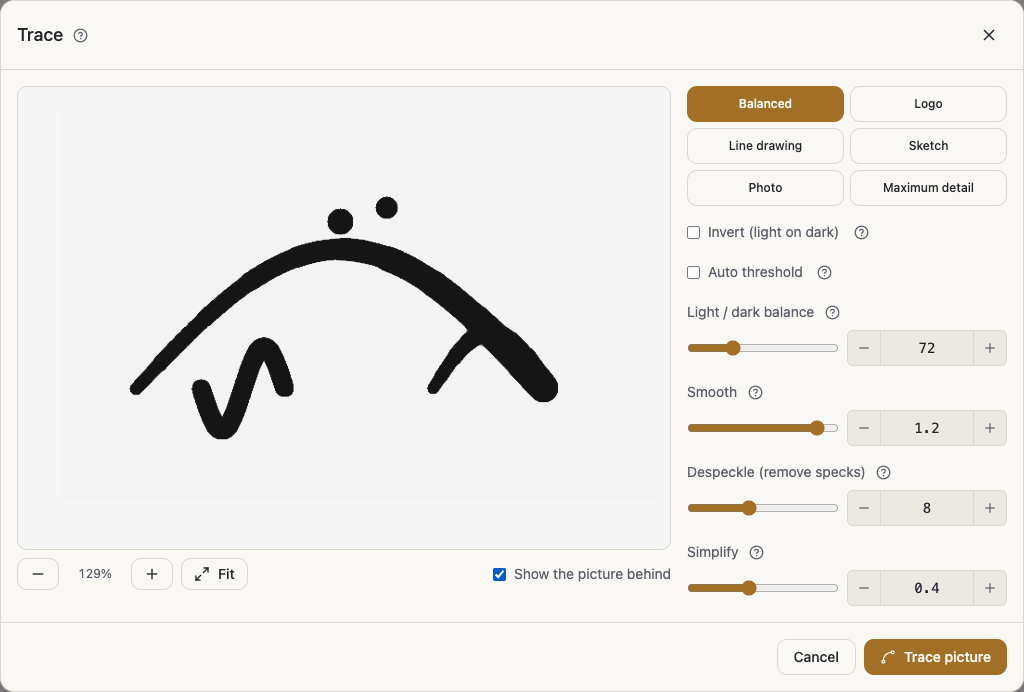
The presets
Six presets shorten the road: Balanced, Logo, Line drawing, Sketch, Photo and Maximum detail.
Start with Balanced for most work, move to Logo for solid clear shapes, and to Photo when the image is full of tone.
The quality controls
Light / dark balance is the line between ink and background, and you slide it when too much or too little is picked up. Auto threshold lets the app choose that line for you.
Invert (light on dark) is for a letter that is light on a dark background. Smooth trades rounder edges against sharper ones. Despeckle removes tiny dots and specks, and the higher it goes the bigger the specks it takes. Simplify uses fewer points, which comes out cleaner and lighter, and too high loses detail.
Show the picture behind puts the original under the result so you can compare.
After the trace
The outline is a real shape: colour it from the paint pop-up, and move its points in the Edit Font Shape and Outline panel.
That panel has Zigzag cleanup, which was built for this case. It removes the fine zigzag on traced edges while keeping the shape, and unlike Smoothing the form barely moves.
Plan and limits
Tracing comes with a paid plan, and the Free plan does not include it. The Pricing section on the home page shows what each plan includes today.
How many traces you get in a month is set by your plan too, and a message tells you when you reach the limit.
A locked layer cannot be traced, so unlock it first. If a picture is too detailed to trace, try the Photo setting, or raise Despeckle and Simplify.